Client Portal
 Enterprise AI
 Agentic Enterprise Builder
 Secure Cloud Foundation
 Google Workspace Launch Pad
 Always Ready Resilience
 Blog
Blog Whitepapers & eBooks
 Events
 Partnerships
 Case Studies
 Company
 Careers

Google Workspace Studio Explained: How to Automate Work With Gemini

Meghan Austin
So you want to automate tasks across Workspace, but you’re not a developer? No problem. Google Workspace Studio makes it easy to build multi-step workflows without writing a single line of code.
From summarizing customer support requests to drafting email responses, Gemini handles it all for you.
Here’s everything you need to know about Workspace Studio and how it works.
What Is Google Workspace Studio?
Launched in December 2025, Google Workspace Studio is a no-code AI workflow automation tool built into the Workspace ecosystem.
It allows you to create, manage, and share AI agents that automate tasks across Google Workspace. Just describe your desired workflow in plain language and Gemini will build an AI-powered agent to automate the task for you.
These agents can analyze information, generate content, and act on context and data from apps like Gmail, Drive, Docs, Sheets, Calendar, and Chat.
Every flow in Workspace Studio has a starter and one or more steps. The starter is the event, or the trigger, that kicks off the workflow. The steps determine what happens next.
So, a starter might be a scheduled time (“every Thursday at 9AM”), an incoming email from a specific sender, a new Google Form response, or when you’re @-mentioned in a Chat space. Each workflow has exactly one starter.
From there, you chain your steps – up to 20 of them. Let’s take a closer look at the process.
How Does Google Workspace Studio Work?
It all starts with a natural-language request. You describe what you want, and Google Workspace Studio will turn your request into a multi-step workflow that can combine actions and AI-powered analysis.
For example, you could type:
“When I get an email from my manager, label it high priority and send me a summary in Chat.“
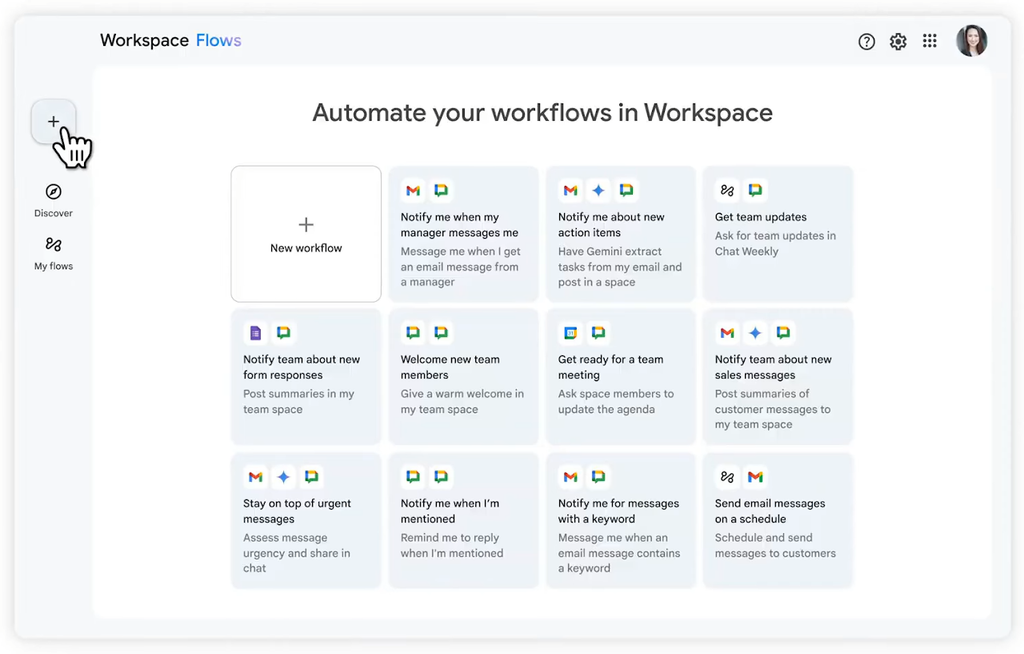
In Workspace Studio, Gemini automatically generates the workflow steps for you. You can then edit the workflow by adding or removing actions, reordering steps to better suit the flow, or even changing the starter.
Another method: choose from pre-installed workflow templates in Workspace Studio. These include flows like automatically welcoming new team members in Chat and notifying your team when a Google Sheet has a new row.
If your workflow requires deeper analysis or knowledge, you can incorporate custom-built AI experts called Gemini Gems. They’re pre-programmed with your own content for specialized tasks.
When you pair a Gem with a workflow, you get an agent that can apply your team’s specific context to the task – such as adjusting marketing copy to match your brand voice.
(See also: our step-by-step Gemini Gem creation guide.)
Tip: You don’t have to limit Studio to Workspace apps! Use its built-in third-party connectors to pull data from Jira, Salesforce, Mailchimp, Confluence, Slack, and Asana into your automations – no Zapier required.
How to Create an AI Agent in Workspace Studio
The first step to creating an AI agent in Google Workspace Studio is figuring out what task you want to automate. Think of a repetitive process involving the apps your organization already uses.
Then build a flow around it in Workspace Studio:
- Give your workflow a name to remember it by.
- Describe what you want to automate in natural language, or start with a template.
- Choose or refine the starter that will trigger the workflow.
- Add steps for the actions you want the agent to take.
- Incorporate a Gemini Gem if your workflow requires AI analysis or interpretation.
- Review and customize your workflow before launching it.
- Share the agent with your team if others could benefit from using it.
Workspace Studio helps you move beyond simple, rule-based automation. There’s no rigid if-this-then-that logic.
Instead, agents can pull context from your Workspace apps – like Gmail, Docs, and Sheets – and reason through problems while adapting to new information on the fly.
Takeaway: With Workspace Studio, you can tackle complex workflows like intelligent prioritization, content generation, support issue triage, smart approvals, and sentiment analysis.
Use Case Example: Automating Customer Feedback Responses
Let’s say you want to create an agent that can manage customer feedback submissions.
First, define your starter. In this case, the workflow is triggered when your customer feedback Google Form receives a new submission.
Then add your steps:
- Ask Gemini to summarize the response from the Google Form and assign a priority indicator.
- Post a notification in your Customer Service Google Chat space.
- Deploy a Gem trained on your organization’s policies and brand voice to draft an email response.
- Send the drafted email, either with or without a review step involving human approval.
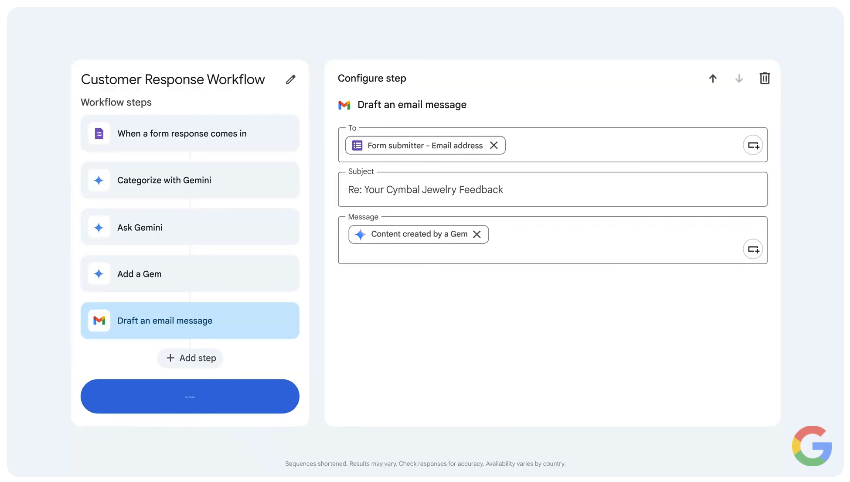
Afterward, check over your flow, make any adjustments, save, and launch and/or share it with your team. Anyone can duplicate it, tweak it for their own use, and skip the trial-and-error you just went through.
Tip: For actions that need extra oversight, like sending an email, you can set a requirement for human approval before the agent proceeds.
Workspace Studio Security: Expanded Controls and Guardrails
Now that Workspace Studio agents can go the extra mile beyond assisting with tasks to actually executing tasks autonomously, security and governance have become increasingly important.
Google has introduced enterprise security controls that give organizations more visibility and control over how agents operate. These include:
- Agent identities and attribution, with the minimal set of privileges required to run.
- Agent access management in the admin console to adjust access scopes and suspend flows as needed.
- Auditing and observability with all agent actions and context recorded in audit logs.
- Runtime protections with additional data loss prevention controls.
- Human-in-the-loop approvals for actions that require end-user confirmation.
Oversight is crucial. These controls give organizations more confidence to put agents to work while staying in control of what they can access and what they can do.
Getting Started with Google Workspace Studio
Not sure where to begin with Studio? Look for any repetitive task that already involves multiple steps or Workspace apps – chasing down unread emails, prepping for meetings, following up on action items, updating a Google Sheet – and build a single workflow around it.
Or start with one of the pre-installed templates. Once you see how a starter and a few steps come together, writing your own flow from scratch gets easy fast.
If Google Workspace Studio has you thinking about what else Gemini could take off your plate, Wursta can help you find out. Whether you’re building your first AI agent, rolling out Workspace Studio across your team, or exploring Gemini Enterprise, our experts can guide you from initial assessment through full-scale implementation and change management.
Ready to put Gemini to work for your organization? Let’s talk.